psychology

chevp-ai-framework

Lifecycle Gates Guidelines Commands Agents Templates

AI writes the code.
You stay in control.

Three steps. Three approvals. No surprise commits.

A simple workflow that lets AI do the heavy lifting — and lets you stop it before it ships something you didn't agree to.

Try it in 2 minutes See an example

MIT License · Works with Claude Code, Cursor, or any AI assistant

What it looks like

A real exchange. The AI announces what it's about to do, and waits for you.

person You

Add Google OAuth login to the app.

smart_toy AI Step 1: Understand

Before I write any code, here's what this will touch:

  • • New files: auth/google.ts, routes/oauth.ts
  • • Schema change: add oauth_provider column to users
  • • New dependency: passport-google-oauth20
  • • 3 existing tests need updating

Does this scope look right?

The AI cannot move forward until you click. Same checkpoint repeats before planning, and again before any code reaches your repo.

Who is this for?

Three people who keep asking the same question: how do I trust this?

code

The Solo Developer

You use AI every day. You're tired of it touching files you didn't ask about, or "improving" things mid-task. You want it to ask first.

groups

The Team Lead

Your team uses AI. You need a paper trail: what was decided, by whom, and why. Code review starts with knowing what should have been built.

shield

The Skeptic

You don't trust AI-generated code — and you shouldn't, by default. You want hard checkpoints where you can say stop before things get out of hand.

How it works

Three steps, each ending with a checkpoint you control.
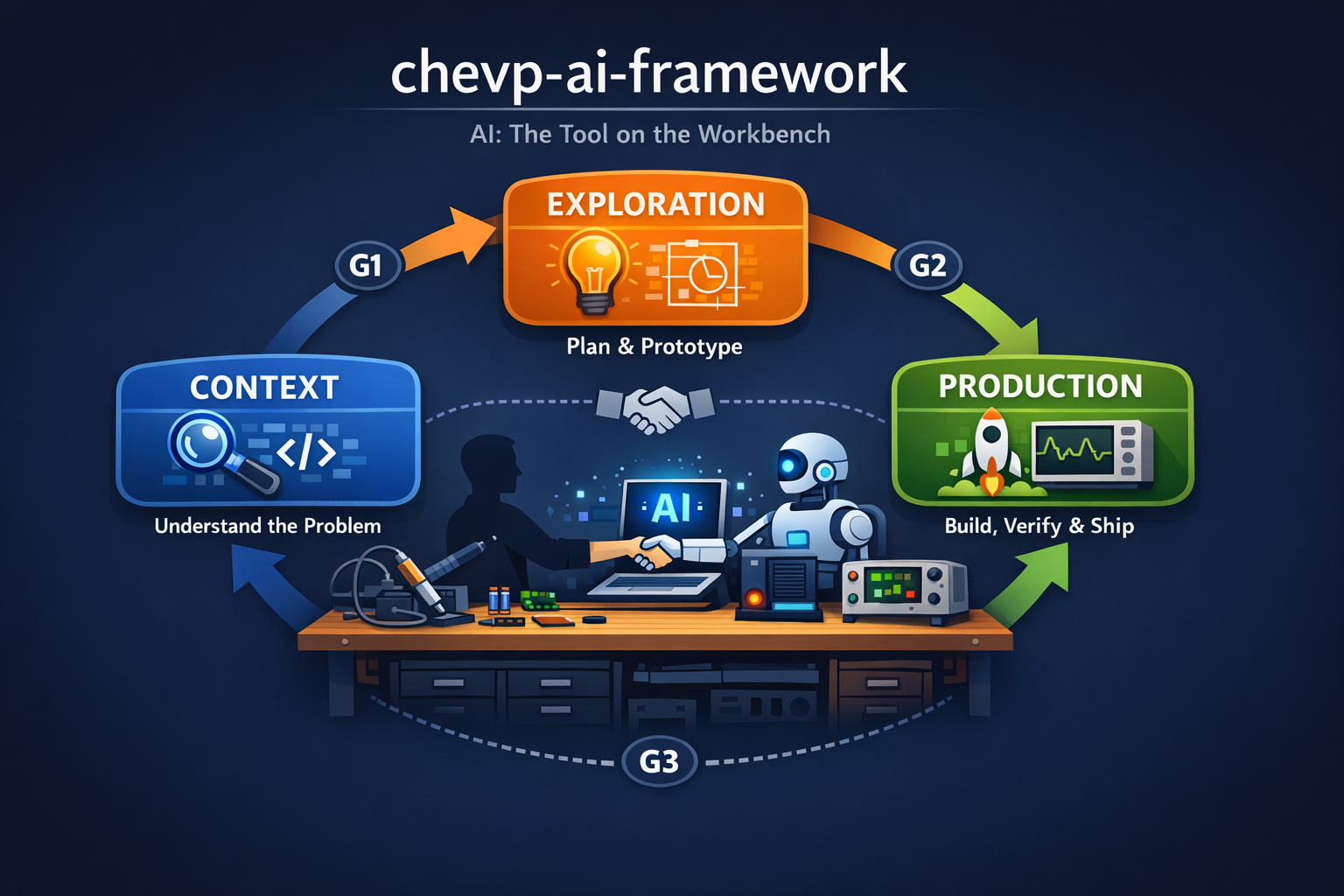
The three-step lifecycle: Understand, Plan, Build
1

Understand

The AI reads your code and confirms what the task actually is — in your terms, not its assumptions.

You see: A short description of the problem, which files are affected, and the agreed scope.

2

Plan

The AI proposes how to solve it — sometimes with a small prototype you can click through — before writing real code.

You see: A written plan, a prototype if relevant, and a record of any architectural decisions.

3

Build

Only now does the AI write production code — following the plan you approved, nothing more.

You see: Working code, passing tests, a clean commit on your main branch.

Three checkpoints — one between each step

The AI cannot cross any of these without your explicit approval.

Checkpoint 1

Did we understand the task?

Before any planning starts.

Checkpoint 2

Is the plan good?

Before any production code is written.

Checkpoint 3

Does it actually work?

Before the change is considered done.

The four rules

Everything else follows from these.

Context before code

An AI without context invents things. The first step is always understanding.

A prototype is not the product

Quickly generated code must be reviewed and understood before it ships.

Small steps, with stops

Validate after each step. No silent leaps from idea to merged code.

The human decides

The AI suggests. You approve. The responsibility never moves.

Deep dive

Browse the framework topic by topic

timeline

Lifecycle

3 steps × 7 roles × 3 modes. The 6 decisions per step.

verified

Quality Gates

G1 / G2 / G3 evidence-based gates. Approval requires evidence.

trending_down

Uncertainty Reduction

Core principle — every step measurably reduces uncertainty.

person_alert

Challenger

Internal sceptic. Top-3 failures, ≥2 alternatives, counter-argument.

groups

Agents

Gatekeepers, Architecture-Reviewer, Governance-Auditor.

quiz

AskUserQuestion

Every decision is a click. Free-text questions are forbidden.

terminal

Commands

/context /explore /produce /gate-check /approve /promote …

extension

Skills

create-adr, create-ctx-plan, create-exp-plan, sync-plan-issues.

webhook

Hooks

Mode reminder, gate enforcement, provenance check.

description

Templates

16 ready-to-use templates — ADR, plans, problem statement…

gavel

Guidelines

10 cross-cutting rules — uncertainty, governance, knowledge routing …

hub

Integration

Kanban, Scrum, SAFe, monorepos, Power Sessions.

Quick Start

Pick the path that matches you.

bolt

I want to try it

Two minutes. One file change.

  1. 1. Open your project's CLAUDE.md (or create one).
  2. 2. Paste in this single line:
@url https://chevp.github.io/chevp-ai-framework/chevp-ai-framework.md
  1. 3. Ask the AI to do something. It will announce its step and wait for your approval.

That's it. No fork, no submodule, no install.

terminal

I want the full setup

For a project where you'll keep plans, specs, and decisions versioned in git.

  1. 1. Add the framework reference (same as above).
  2. 2. Create a directory for the artifacts:
mkdir -p context/{architecture,adr,guidelines,plans/finished,specs}
  1. 3. Optional: install the Claude Code plugin for slash commands and automatic gate enforcement.

The plugin is optional. The framework works either way.

Honest answers

The questions people actually ask.

Won't this slow me down?

add

Yes — on small tasks. A one-line fix doesn't need three checkpoints. You can skip the framework for those.

For real work, it's faster overall. The time you spend on a 30-second scope check at the start is time you don't spend rolling back a half-finished feature the AI invented in a direction you didn't want.

Do I need Claude Code specifically?

add

No. The framework is plain Markdown that any AI assistant can read — Claude Code, Cursor, Copilot, ChatGPT, whatever you use.

Claude Code gets a few extras (a plugin with slash commands and automatic enforcement), but the workflow itself is portable.

What about quick reads or one-line fixes?

add

Reading code, explaining things, answering questions — all free. No checkpoints.

The framework only kicks in when the AI is about to create, edit, or delete a file. That's the line where things get serious.

Solo developer or team — who's it really for?

add

Both, but the value shifts. Solo: you avoid losing an afternoon to a rabbit hole the AI happily dug for you. Teams: you get plans and decisions written down, so code review starts with shared context instead of guesswork.

Can I extend it for my domain (games, data, mobile)?

add

Yes. The core is generic. You can layer a domain-specific framework on top with your own templates, conventions, and rules. See the repo for the extension pattern.

Is this just process bureaucracy?

add

Fair question. The whole framework is three steps and three checkpoints — that's the entire surface. Everything else (templates, role definitions, the deeper docs) is optional structure for when you want it.

If a one-paragraph rule in your CLAUDE.md already does the job, use that. The framework is here when ad-hoc rules stop being enough.

Ready?

Two minutes to try. One line to integrate.

Quick Start View on GitHub